

Mastering Attachments in ArchForm: Position, Size, Geometry, and Biomechanics
Clear aligner biomechanics are only as effective as the attachments that support them. Far from being “retention bumps,” attachments are active biomechanical tools that define force vectors, moments, anchorage, and movement predictability.
ArchForm was designed to give orthodontists full biomechanical control over attachments, allowing precise customization of position, size, geometry, and interaction with the tooth’s center of resistance. This article walks through the fundamental principles that should guide attachment design and placement and how they translate into predictable clinical outcomes.
Attachment Position and the Center of Resistance
Every orthodontic movement revolves around one key biomechanical concept: the center of resistance (CR). Since aligner forces are applied to the crown and not directly to the CR, any force inherently generates a moment.
The farther the attachment is positioned from the center of resistance, the greater the rotational moment generated on the tooth.
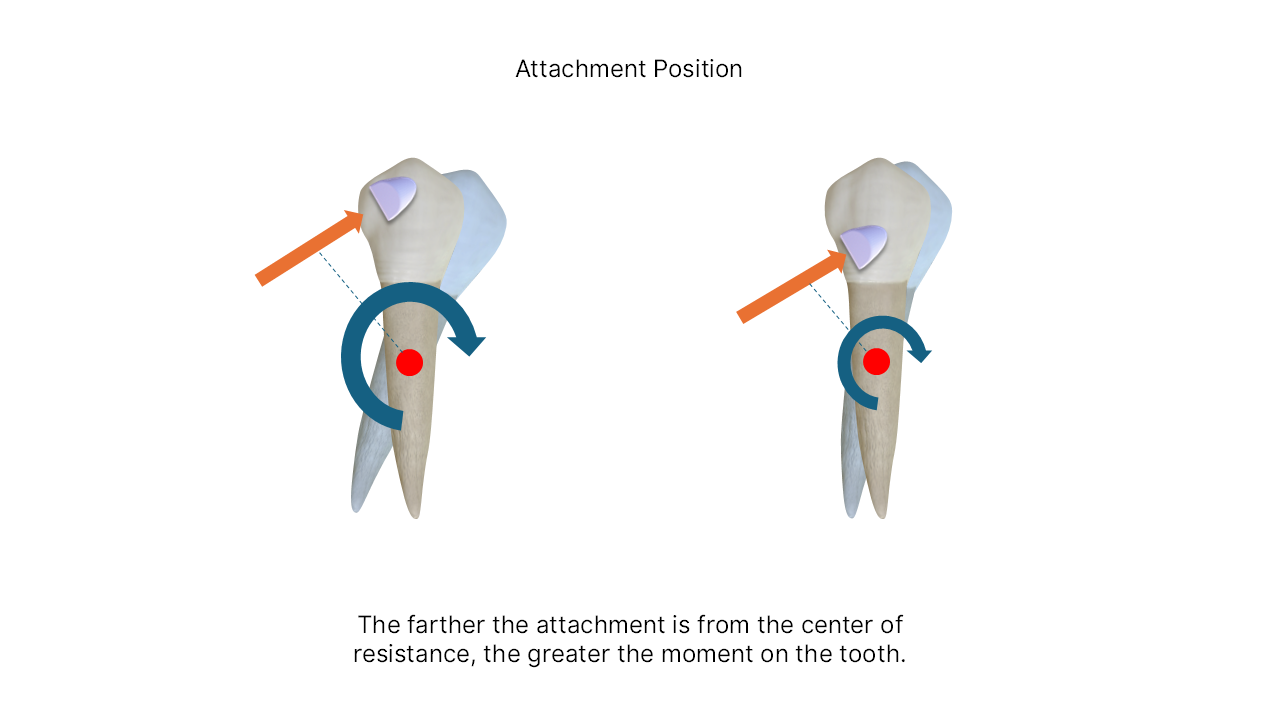
This principle explains why attachment position is often more critical than attachment size. Proper vertical and horizontal placement allows the clinician to intentionally increase or reduce tipping, rotation, or bodily movement tendencies.
Gingival Safety and Aligner Adaptation
While biomechanical efficiency is important, biological safety and aligner adaptation must never be compromised.
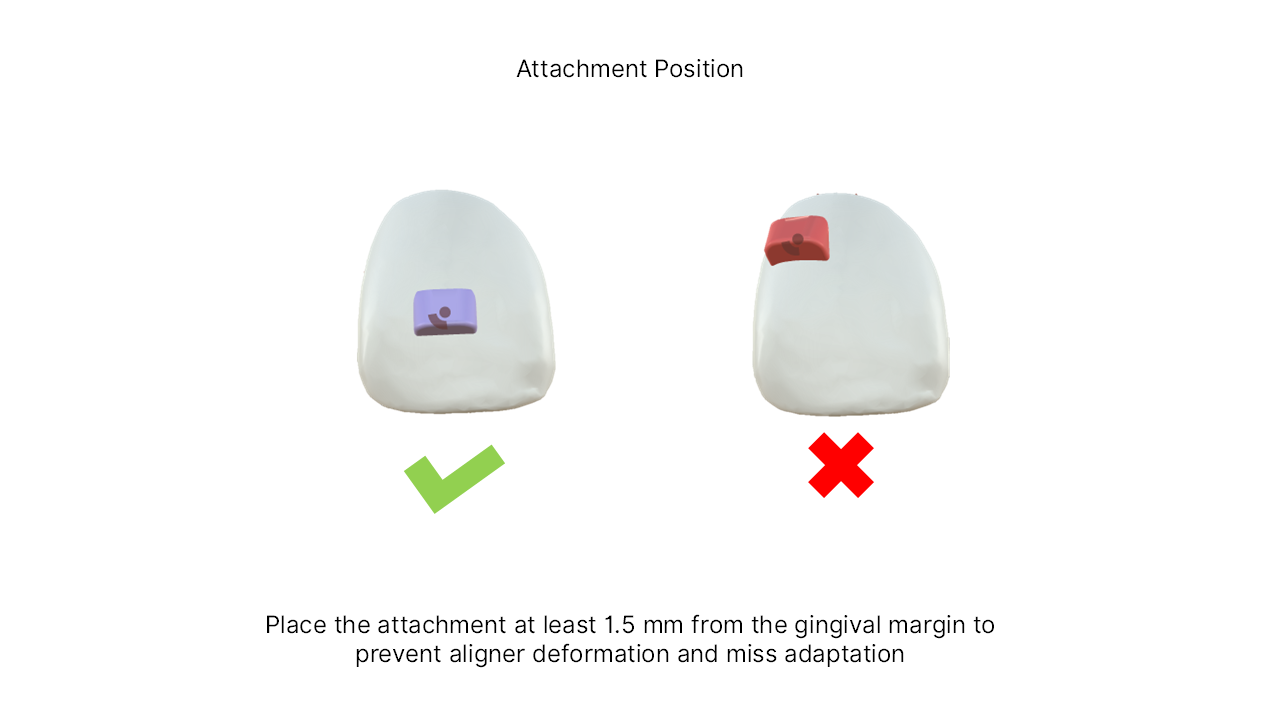
Attachments placed too close to the gingival margin interfere with aligner seating, increase deformation of the plastic material, and can result in poor tracking.
Clinical guideline:
➡️ Maintain at least 1.5 mm from the gingival margin to prevent aligner deformation, soft tissue interference, and loss of adaptation.
ArchForm actively assists clinicians by flagging attachments placed too close to the gingiva with visual warnings, adding an extra layer of digital safety.
Attachment Size: Efficiency vs Comfort and Esthetics
Increasing attachment size increases the available contact surface between the aligner and the tooth, which directly improves force transmission and control.
However, larger attachments also increase:
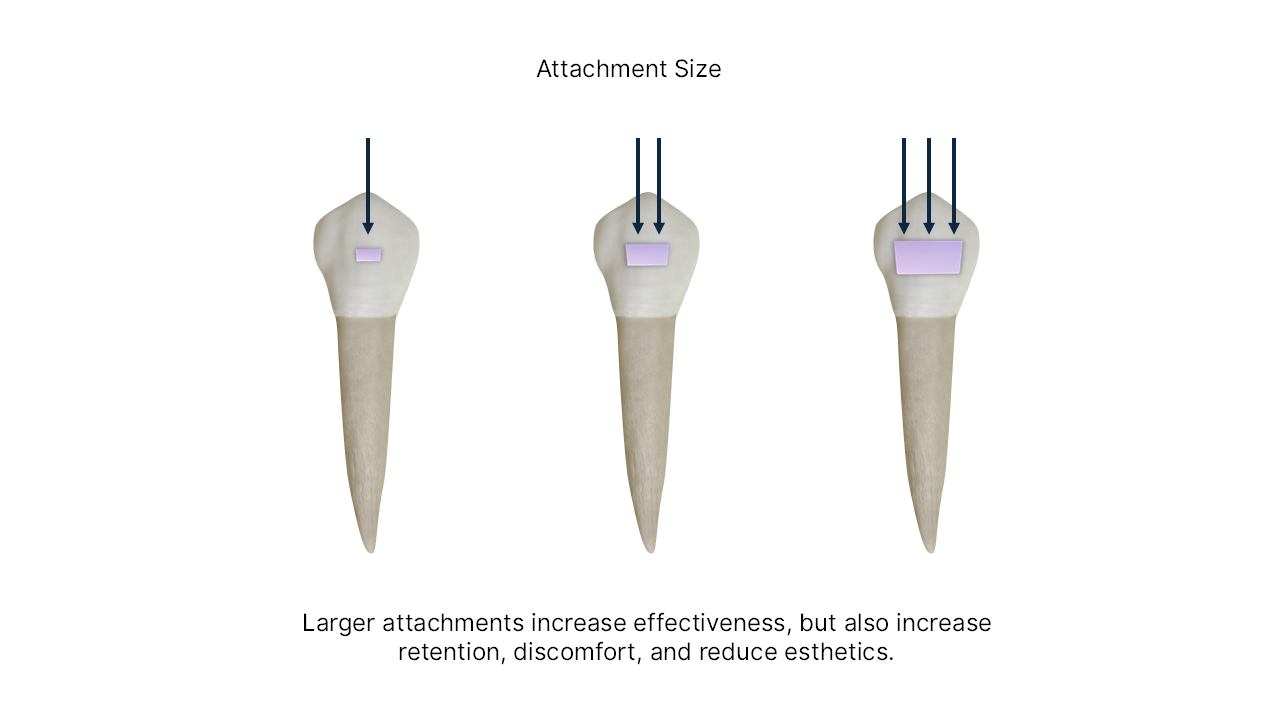
The key is intentional sizing. In low-demand movements, smaller attachments preserve comfort and aesthetics. In complex movements such as rotation, torque, or distalization, larger attachments may be biomechanically justified.
ArchForm allows clinicians to precisely adjust height, width, thickness, and insertion depth, balancing efficiency and patient experience.
Attachment Geometry and Force Direction
Attachment geometry determines how forces are expressed, not just how strongly.
A fundamental rule applies:
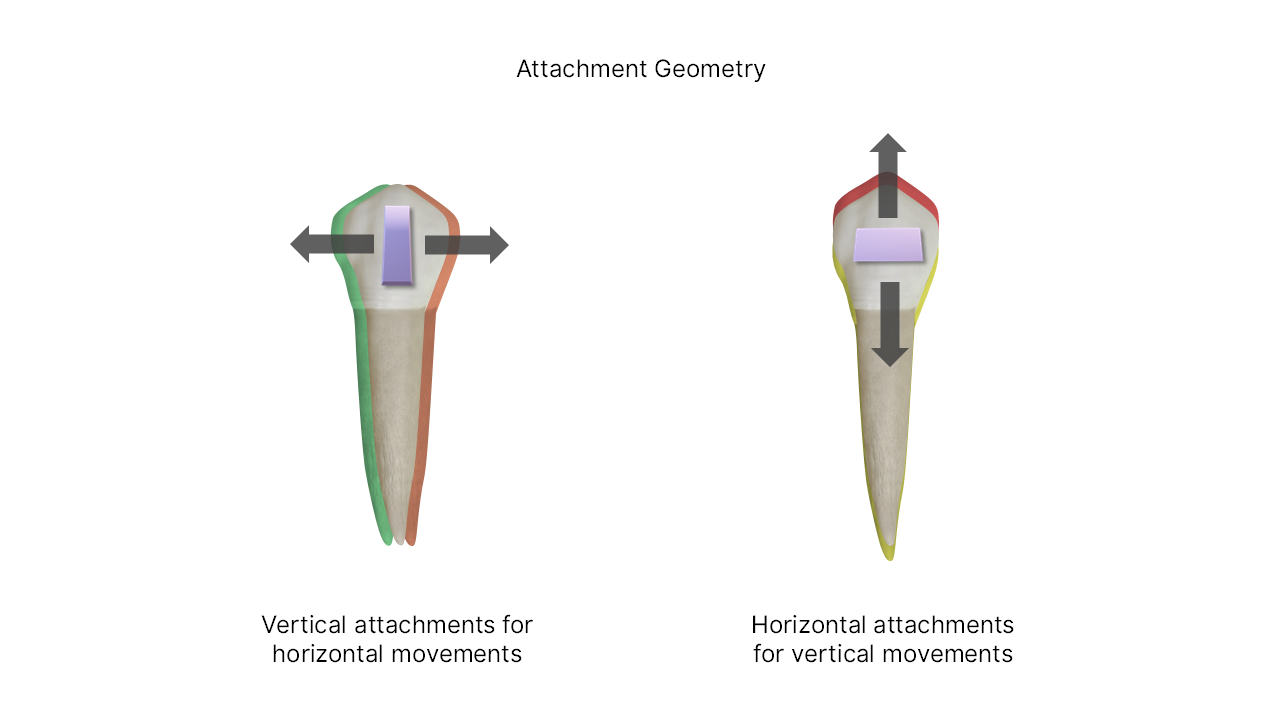
By selecting the correct orientation, the orthodontist can fine-tune whether the aligner produces translation, intrusion, extrusion, or controlled tipping.
This level of geometric control is particularly valuable in asymmetrical anatomies and complex staging sequences.
Biomechanics: From Bodily Movement to High Moment Control
Not all movements require the same moment-to-force ratio. Some cases demand bodily movement, while others intentionally use tipping followed by uprighting.
Because forces are applied to the crown, all aligner movements exist along a spectrum: from bodily movement to pure rotation around the center of resistance.
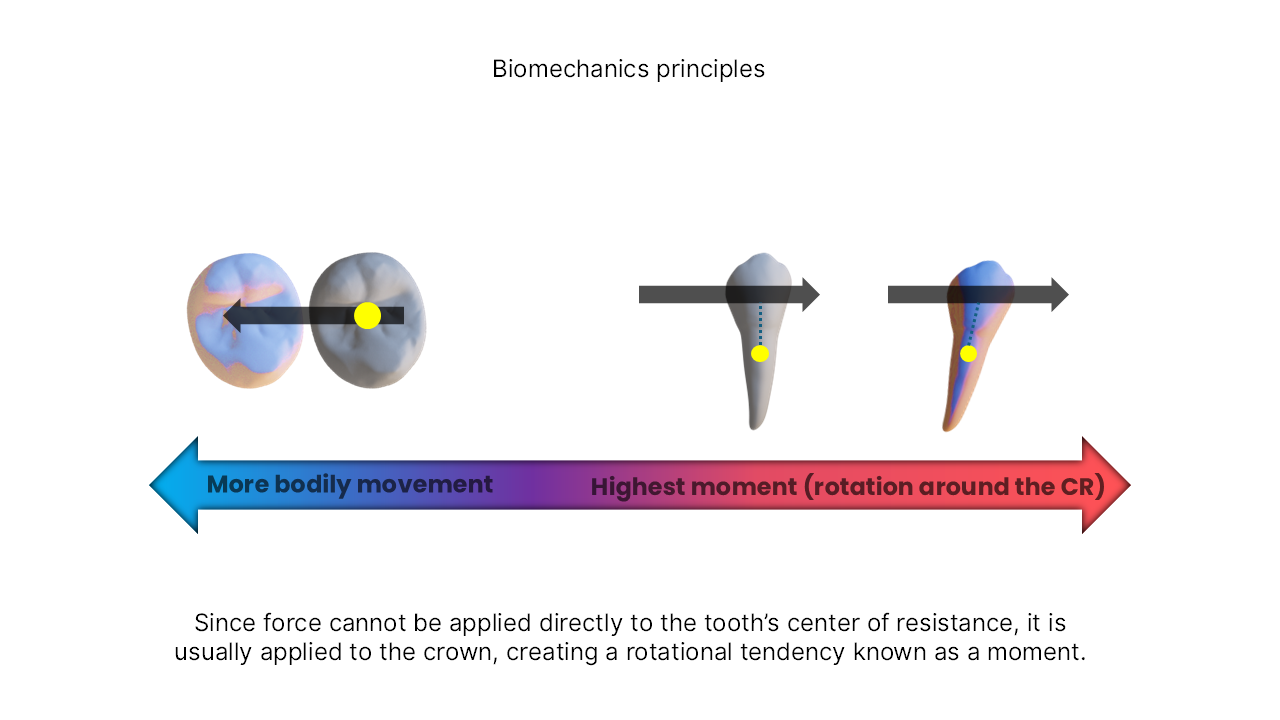
ArchForm enables clinicians to control this spectrum through:
This transforms aligners from passive appliances into active biomechanical systems.
Matching Attachments to Target Movements
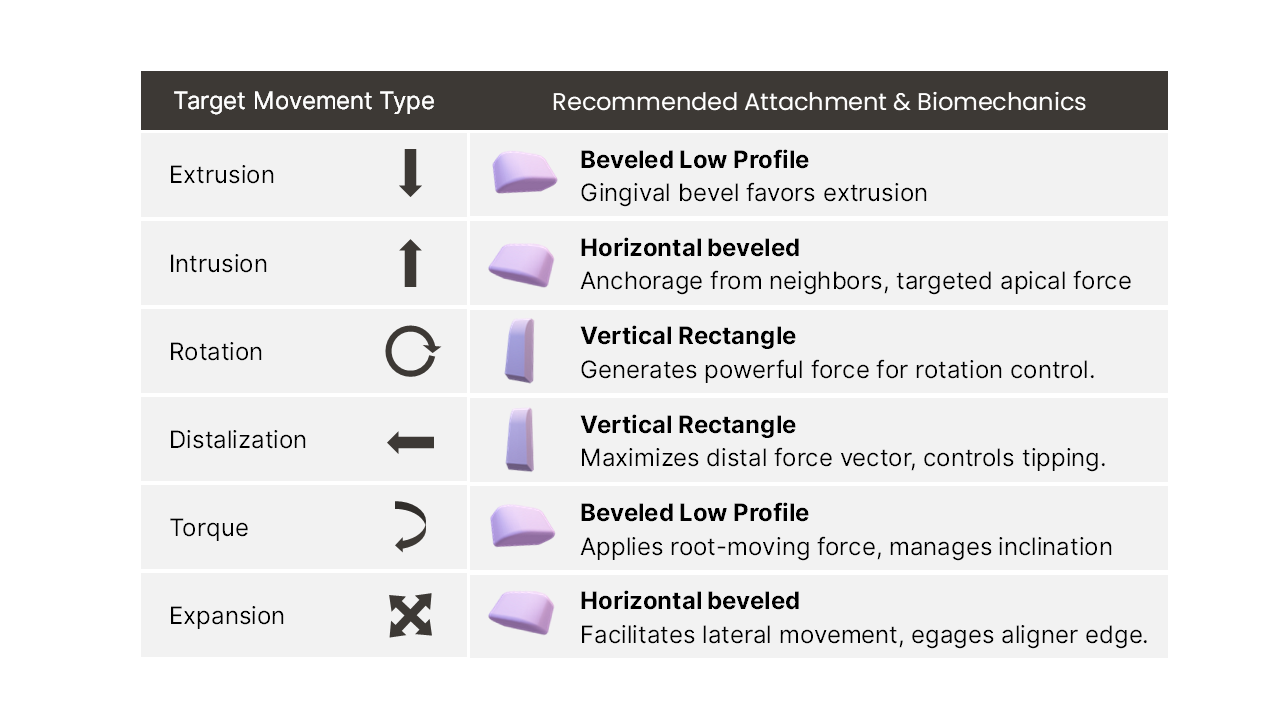
Attachment selection should always be movement-driven. Different movements require different geometries and force strategies.
Practical Guidelines:
These principles are fully supported by ArchForm’s manual tools and auto-attachment system.
Translating Biomechanics into Digital Precision with ArchForm
What truly sets ArchForm apart is the ability to convert biomechanical reasoning into repeatable digital workflows.
With ArchForm, clinicians can:
This ensures consistency, predictability, and scalability, whether planning a single case or managing a large clinical workflow.
Conclusion
Attachments are the bridge between digital planning and real tooth movement.
When designed intentionally, considering position, size, geometry, and biomechanics, they transform aligner therapy into a highly predictable and sophisticated treatment modality.
ArchForm provides the tools to go beyond generic attachment placement, allowing orthodontists to fully express their biomechanical philosophy in a digital environment.
Mastering attachments means mastering aligners, and with ArchForm, that mastery is entirely in your hands.